The Vendor Custom Restock Suffix feature will allow Users to add additional identifying information to Restock PO numbers in MotionMD. The suffix details will be appended to the MotionMD PO number and transmitted to Vendors no matter the method – fax, email, print or EDI. The suffix can be alpha, numeric or alphanumeric with a maximum of 10 characters. No special characters are allowed and the suffix is automatically capitalized when being entered. This new feature must be enabled for the account to utilize it.
The process begins with selecting the Vendors with items to Restock.
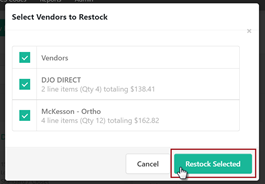
After clicking Restock Selected, Users are brought to the Restock form page. There will be a new line under each Vendor where the Restock Suffix can be entered.
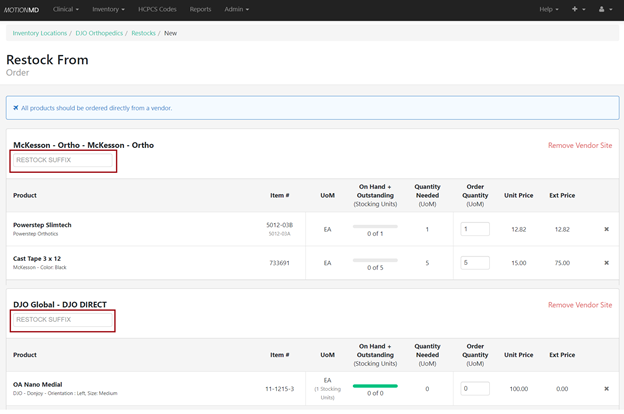
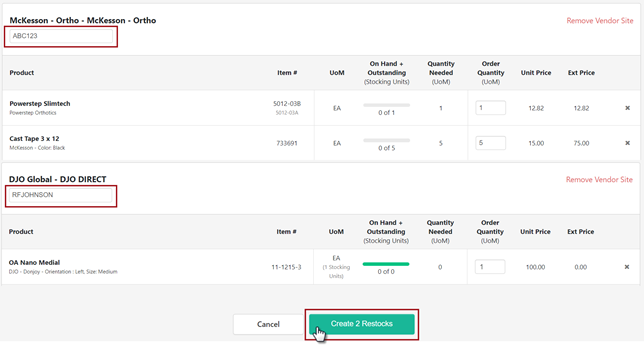
Add the suffix details to the Restock Suffix line. The suffix can be alpha, numeric or alphanumeric with a maximum of 10 characters. No special characters are allowed, and the suffix is automatically capitalized when being entered. If a Vendor does not need a Restock Suffix, leave the line blank. When finished making updates to the page, click Create X Restocks button.
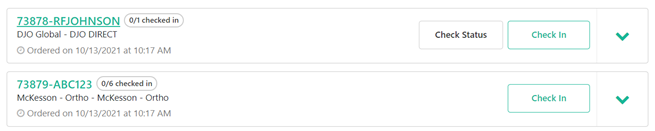
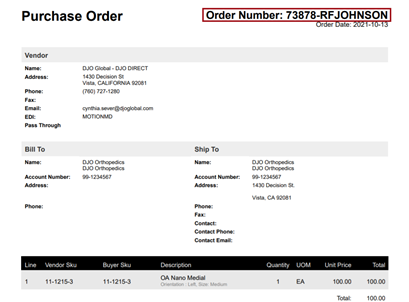
The created restocks will show on the Incomplete Restocks tab where the MotionMD PO and appended Restock Suffix can be viewed. If a Restock Suffix needs to be changed, Cancel the restock at this point and reset the suffix. If not, click the Place Order button to send the restock to the Vendor. The entire PO number will be transmitted to Vendors no matter the method – fax, email, print or EDI.
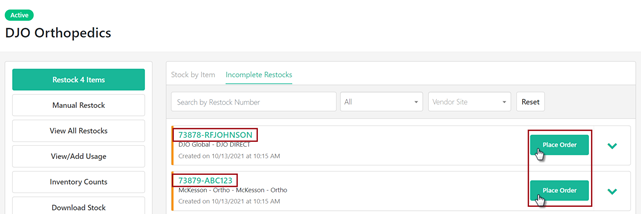
The Restock Suffix will stay appended to the MotionMD PO number.
The Incomplete Restock Tab:
The Restock PDF:
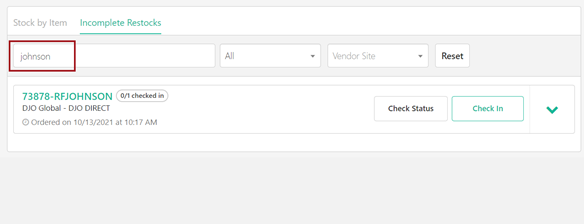
Restocks can be searched by the Restock Suffix:
**Printable PDF Available**