The Request Follow-up feature may be enabled in a MotionMD account. When activated, a user can select a patient agreement (PA) for follow-up prior to submission to billing. To add this feature in an account, please submit a Help Ticket in MotionMD.
Once enabled, a user can Request Follow-up from within a PA or in an Expanded PA view:
PA View:

Expanded PA View:
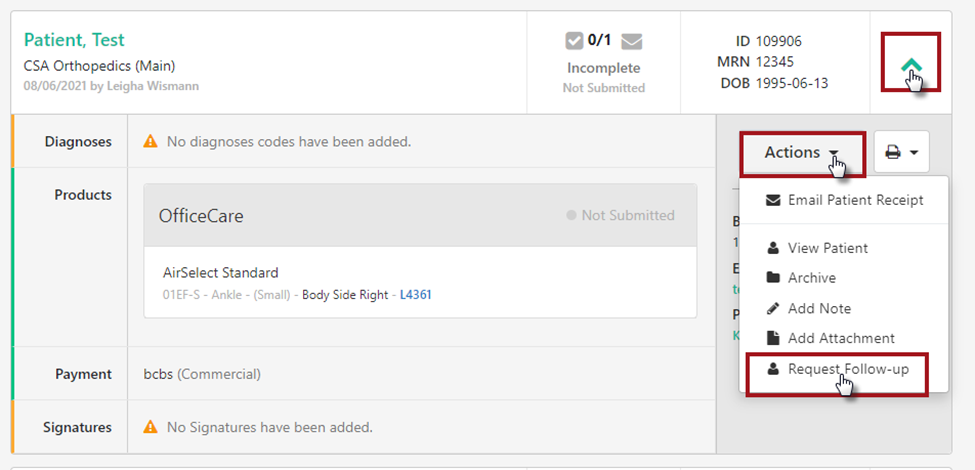
After the Request Follow-up option is selected, a model will pop up with a drop down to select a Follow-up category and Save Changes.
If selected, a Follow Up pill will then be present on the PA when viewed in the Patient Agreements tab. The pill indicates the need to follow up with an action on the claim. It also prevents a claim Ready for Billing from being accidentally submitted to billing.
To filter PAs that have Follow Up selected, select the Needs Follow Up tab on the PA+BS page.
Once all the additional actions needed on the PA have been completed, select the I Followed Up pill on the PA or in the expanded PA view to proceed with processing the PA.
PA View:

Expanded PA View:
Completing the I Followed Up is required to submit a claim in follow-up status to billing. If not completed, a user will receive the following error message:

After the follow up is complete, the claim is now ready to be submitted to billing.

**Printable PDF Available**