A preference is assigned to a product at the Inventory Item/SKU level. The preference is utilized to set the dispensing and billing channel details for each SKU. The ability to edit and assign preferences is based on roles assigned. Follow the steps outlined below to set or edit preferences for a product(s):
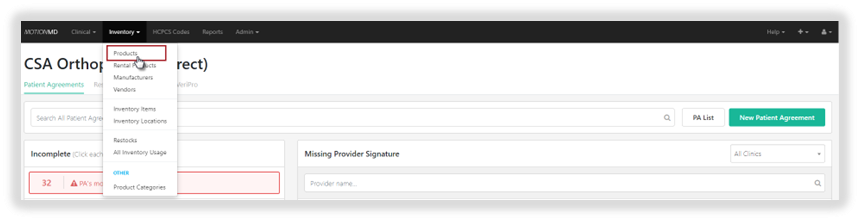
On the main navigation bar, select Inventory > Products:
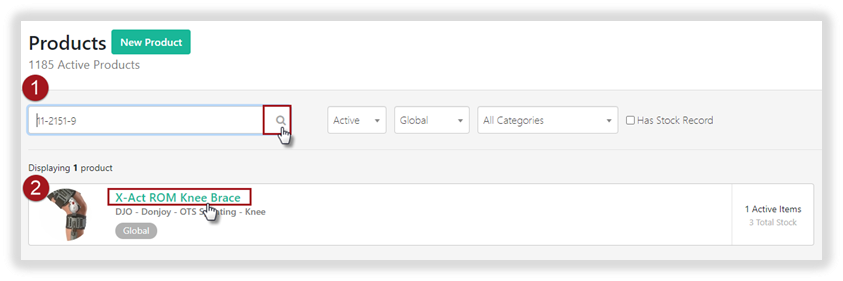
Use the Search box to type in the product name or SKU and select the product from the list returned.
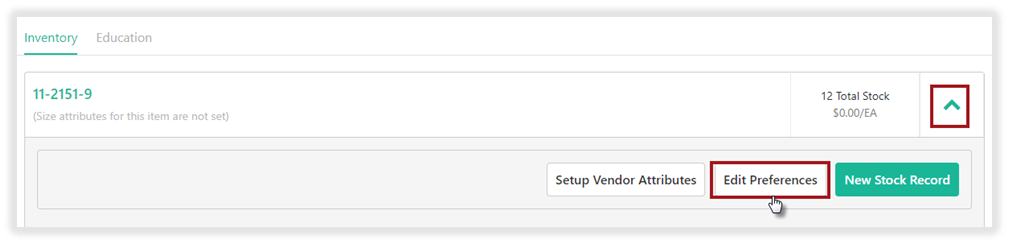
Once the Product has been selected, use the green down arrow to open additional options. Select Edit Preferences to initially set or edit existing preferences.
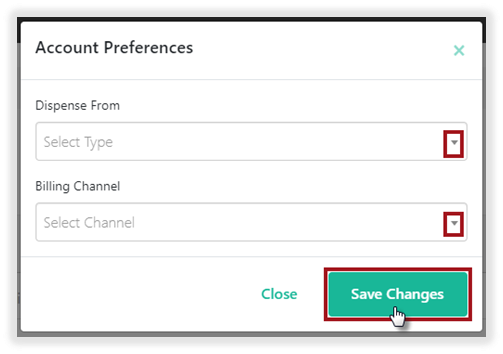
A pop-up window will appear to set preference:
- Select Dispense From using the down arrow
- Billing Channel
- Select Save Changes
To update or add multiple preference, please utilize the reference guide, Inventory Item Preferences Upload.
**PRINTABLE PDF AVAILABLE**