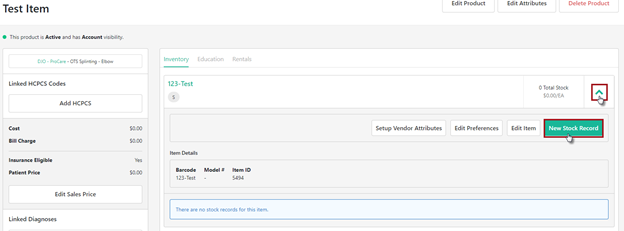
To create a new stock record for an Inventory Item, navigate to the Product and expand the SKU. Utilize the New Stock Record button to select the location.
NOTE: The option to set Vendor Attributes and Preference is also available if they haven’t been previously set.
A pop-up box will appear to select the Inventory Location. Adjust Par Level and Stock Counts as needed Once complete, select Create Stock Record.
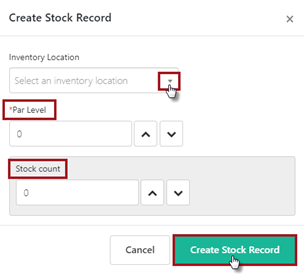
Repeat these steps for each Inventory Item that needs stock records created.
NOTE: If there are several items that need stock records created, there is an option to Mass Upload vs. Manual creating stock records. Reference the Inventory Upload Instructions guide for additional information.
**PRINTABLE PDF AVAILABLE**